The best international phone call app for businesses is Google Voice, because in addition to its ease of use and affordable international rates, you can also call any landline in the US and Canada completely free. On top of that, Google Voice was one of the most secure services across our in-depth research, which evaluated 10 different VoIP providers and their apps against 44 categories of of investigation.
For personal use, though, there is a wide range of free-to-use, app-to-app platforms that can get the job done. WhatsApp is our top pick, thanks to its massive user base around the world and it’s robust communication functionality that includes messaging and communities.
In this guide, you’ll learn about the best international calling apps in 2026, including how much they cost, what they can do, and whether they’re a better fit for businesses or personal use. You can also use our free quote generator to get a personalized recommendation and pricing quote now.
Key Takeaways
- Types of international call apps: There are two options when it comes to calling internationally. For personal use, you should go with free, app-to-app platforms like WhatsApp and Facetime. For businesses, full-on VoIP systems like Google Voice and Vonage are a better fit.
- Pricing: Many international calling apps for personal use are free, particularly if they use the app-to-app model, but business-facing plans will cost you between $10 per month and $40 per month, depending on your business.
- How to choose: There are lots of factors to consider, including pricing, features, whether you want to call phone numbers or other app users, and security protocols like end-to-end encryption.
- Business use: Top picks for businesses are Vonage and Ooma, due to their unlimited calling plans with advanced phone features.
- Why trust us: Tech.co evaluates VoIP platforms across multiple dozens of categories for the best recommendations.
In this guide:
- Best International Call Apps
- How International Call App Pricing Works
- App-to-App vs App-to-Phone: What’s the Difference?
- How Much Do International Phone Call Apps Cost?
- What Are the Benefits of VoIP Phone Systems?
- How We Test International Call Apps
- Verdict: What Is the Best International Calling App?
- Frequently Asked Questions
Best International Phone Call Apps Reviewed
Now that you’ve got a basic idea of what these international calling apps offer as far as price and features, take a look at our in-depth reviews of each of these providers to make an informed decision. We’ll explain price points, feature sets, and whether or not the app is better for business or personal use.
- Google Voice – Best for workplace efficiency
- WhatsApp – Best for personal users
- FaceTime – Best for iPhone users
- Rebtel – Best for unforeseen disruptions
- WeChat – Best for businesses targeting the Chinese market
- NobelApp – Best for users who need money transfers
- Vonage – Best for communication consolidation
- Ooma – Best for medium-sized businesses on a budget
- Rakuten Viber – Best for overall affordability
Expert tip
It’s important to narrow down what you actually need from a VoIP system first, as there’s quite a range of different functions on offer from different providers and international call apps.
If you’re just an individual looking to stay in touch with friends and family abroad, the free app-to-app calling options on this list are going to be your best options. Popular communication platforms like FaceTime and WhatsApp will let you call internationally at no charge and don’t require a lot of setup or investment. You can only call people with those apps, though, so make sure everyone has them downloaded before committing to this solution.
If you’re a business looking to set up a VoIP system with international calling capabilities, that’s another story. Platforms like Google Voice and Vonage are better set up for this, with clear rates and packages that can get you calling internationally today, for a monthly fee, of course. Plus, you’ll be able to call anyone with a phone using these services, so they’re more geared towards business functionality.
| Starting price The typical lowest starting price. The lowest price available for your business will depend on your needs | International calling rates | Free app-to-app calling | Calls to landline & mobile | International texting | Worldwide availability | ||||
|---|---|---|---|---|---|---|---|---|---|
| FEATURED PROVIDER | BEST OVERALL | BEST FREE APP | |||||||
| N/A | N/A | ||||||||
| | | | | | Paid version only | | | | Paid version only |
| | | | | | | | | | |
| | | | | | Paid version only | | | | Paid version only |
| | | | | | | | | | |
| | US only | | iOS devices only | | | | 15 countries | North America only | |
1. Google Voice – Best for Workplace Efficiency
- Advanced AI features that can help reduce workforce burden
- Simple setup process and intuitive interface for beginners
- Unlimited calling to landlines and mobile devices in US and Canada
Google Voice has become an incredible valuable tools for businesses in 2026, thanks to the bevy of AI-powered features it and the entire Google Workspace ecosystem has been bestowed. For Google Voice specifically, features like AI voicemail transcription and analysis can help your smaller teams handle more calls, improving efficiency across the board.
Google Voice offers great integrations, competitive international rates, and dual functionality for business and personal use, making it one of the most universal international call apps on this list. More importantly, it pairs with Google Workspace, arguably the best overall business platform, integrating with tools like Google Calendar and Gmail.
In our testing, we found the Google Voice app easy to use and set up, with lead writer Conor Cawley going from downloading the app to making a call in just under three minutes. The call handling experience was particularly intuitive thanks to the sidebar menu. The numbers on the virtual keypad are nice and wide, for ease of dialing, especially on a touchscreen.
We spoke to other Google Voice users to get a clearer picture of how it can improve communication at businesses in 2026.
Google Voice User Review
Google Voice is my VoIP of choice. We’ve been using it for several years now. It’s easy to set up, is already set up with Gmail, and is super convenient. It uses AI to block spam calls, and it integrates with Google Calendar, which is so cool. Sometimes, the voicemail transcription can be a little weird, but that’s er my only major complaint about it. Everything else I love about Google Voice: I don’t see myself switching providers for a long time.
Martin Gasparian spoke with Tech.co about how Google Voice is the best option for his business.
With Google Voice, you’ll get access to a great range of features, including voicemail transcription, spam call protection, and call screening – all of which are incredibly helpful if you’re looking to optimize and streamline your processes. Additionally, unlike some of the international call apps on this list, you’ll get an actual phone number to use on smartphones and computers, which is certainly easier than only app-to-app communication.
One thing we found that sets Google Voice apart from the rest is its security features – with multi-factor authentication, user permissions on all plans, and the largest number of compliance certificates of all the providers we tested. This is important for businesses that are concerned about cybersecurity risks.
Check out our Google Voice review for more information
We found the Google Voice app simple yet functional for international calling. Source: Tech.co testing
How much does Google Voice cost?
For personal use, Google Voice will cost you a bit of money, but the international rates are quite affordable. Here’s a quick list of some countries and their rates:
- United Kingdom – $0.01 per minute
- India – $0.02 per minute
- Mexico – $0.01 per minute
- China – $0.04 per minute
- Australia – $0.01 per minute
- Brazil – $0.01 per minute
For businesses, it’s a different story. There are three different pricing plans to choose from, each with an increasing number of features and allowances. Here’s how those plans match up:
- Starter – $10 per month
- Standard – $20 per month
- Premier – $30 per month
The Standard plan is where the real value lies, allowing for unlimited users and unlocked advanced features like ring groups and call recording. In comparison, the Starter plan allows for only 10 users, so larger teams will need to pay a bit extra.
It’s worth remembering that Google Workspace is required to access the Google Voice functionality for businesses, which also offers a number of different pricing plans, starting at $7 per user, per month.
Check out our Google Voice review for more information
Is Google Voice better for business or personal use?
When we compared Google Voice with other VoIP providers and international call apps, it was clear that Google Voice wasn’t the best VoIP service for businesses overall.
While it is relatively affordable, provides the most secure VoIP software according to our research, and offers good functionality for both business and personal use, it lacks the advanced features and collaborative tools (such as toll-free numbers and built-in team messaging) needed to be truly beneficial to high volume international callers and businesses. Because of that, we’d say it’s better for personal use.
However, every business is different, and the size of your company matters. So, if you are looking for the best VoIP provider for your individual needs, you’d benefit from taking our free 45-second survey which will provide you with a quote tailored to your business’s requirements.
We found Google Voice to be a helpful tool for team communication, with easy features for call recording. Source: Tech.co testing
Expert Tip
Although WhatsApp is completely free and perfectly serviceable for making international calls, Google Voice is a much better fit if you’d like an app that’s suitable for both business and personal use. It’s got a cleaner interface, as well as features like ring groups, auto attendants, and voicemail transcription, so customer service and sales teams are likely to get more out of it.
2. WhatsApp – Best for Personal Users
- Free, app-to-app international calling and messaging
- Massive userbase of 2 billion worldwide
- Limited but functional business pricing option available
WhatsApp is the best choice for personal users because it offers free app-to-app international calling to its nearly 3 billion users.
It’s also very easy to use. We were able to download WhatsApp from the Google Play Store in a matter of seconds. Even better, the setup process was very quick and just involves linking up a phone number to our new account. No passwords needed!
The ease of use doesn’t take away from its functionality either. WhatsApp provided us with messaging and calling, as well as advanced social media-like features like Communities, which allows users to connect in topic-based forums and groups.
WhatsApp is a go-to communication tool for millions around the world. Source: Tech.co testing
How much does WhatsApp cost?
WhatsApp is absolutely, 100% free of charge for personal use. Yes, it does use data when you’re not connected to Wi-Fi, so it could incur charges from your service provider, but as far as pricing plans go for WhatsApp for personal use, there are none.
Now, if you want to try out WhatsApp for Business, there are a few rates you’ll have to consider, as the system does utilize conversation-based pricing to charge internationally. This means that, depending on what your business is using the service for, you’ll be charged differently based on four categories. If you were calling the UK, for example, here’s how those categories would look.
- Authentication – $0.022
- Utility – $0.022
- Marketing – $0.0529
- Service – $0
So, if your business is using WhatsApp Business to market to new customers, you’ll have to pay a bit more than if you’re using it as an authentication system. Even better, service functionality is free in most countries, so you can get started with very little overhead.
Is WhatsApp better for business or personal use?
WhatsApp should definitely be used for personal use. It’s massive collection of users around the world make it a clear choice for getting in touch with friends and family. However, the lack of business functionality doesn’t make it a good fit for those trying to get work done.
While there is a WhatsApp for Business option, it’s almost exclusively geared towards communicating with customers and that’s it.
3. FaceTime – Best for iPhone Users
- Free, high quality international audio and video calling
- Exclusively for iPhone users
- No messaging capabilities available
FaceTime is the ideal solution for Apple users, offering free, high quality audio and video calls within the iOS ecosystem. Sorry Android users, this one isn’t for you.
FaceTime is naturally updated on a regular basis, adding new features to go along with new iOS launches over time. At the time of writing, iOS 26 is the most recent version.
Outside of the US, though, iPhones aren’t nearly as universally popular (especially in Asia, where Android market share is approximately 83%), so this could create some obstacles in the long run. However, there are 728 million iPhone users out there, so it’s certainly worth a try – especially if you know that the people you want to call are Apple users.
FaceTime is a popular video calling platform available exclusively to iPhone users. Source: Apple
How much does Facetime cost?
Again, much like WhatsApp, FaceTime is absolutely free no matter what. You may incur data charges if you use it without Wi-Fi, but you will never have to pay for the app or the specific calls you make internationally.
Is FaceTime better for business or personal use?
FaceTime is certainly aimed more at personal than business-use scenarios. Even with the built-in video capabilities, you wouldn’t want to rely on the app to stay in touch with your team. For personal use, though, FaceTime is a great option for free international calling, as long as you’re talking to iPhone users.
4. Rebtel – Best for Poor Signal Areas
- Excellent call quality and reliability due to landline functionality
- Unlimited calling to 50 countries with $12 per month Unlimited plan
- By-the-minute rates available for other users
Rebtel provides the best call reliability and quality on this list, because rather than using VoIP technology, it relies on landline infrastructure to make calls. This means that you won’t be reliant on a network connection to call internationally, so unforeseen disruptions like storms and outages won’t get in the way.
In fact, we tested Rebtel on a 4G connection with only two bars and noticed no issues. The audio remained stable throughout the call and there was zero packet loss.
Outside the obvious benefits of call quality, Rebtel offers a traditional phone service app that works great and isn’t difficult to figure out. Plus, with its unique Red Box feature, you’ll be able to get a unique, catered price based on your specific usage.
The Rebtel settings were easy for us to adjust in the app. Source: Tech.co testing
How much does Rebtel cost?
Rebtel is a bit more traditional when it comes to international calling. It offers a $12 per month unlimited plan, which allows for unlimited calling to 50 countries, mobile or landline.
Additionally, Rebtel offers very competitive international by-the-minute rates for countries all around the world with calls to India from as low as 2.39¢ per minute and calls to both the UK and Mexico from 2¢ per minute.
Is Rebtel better for business or personal use?
This kind of depends on how you run your personal life and your business life. If you’re an avid traveler in your free time, Rebtel would make for a perfect lifeline to stay in touch with loved ones on the road.
Additionally, if you travel a lot for business, Rebtel would be incredibly convenient for attending meetings without Wi-Fi or cellular coverage. Otherwise, if you don’t need the added connectivity and quality around the world, you could probably opt for something a bit less costly. You can use our free comparison tool to find the best VoIP system within your budget.
5. WeChat – Best for Business Targeting the Chinese Market
- Free, app-to-app international calling, messaging, and video conferencing
- One billion users worldwide, but larger concentrated in China
- WeChat Out service provides international call rates
WeChat represents a very popular option for messaging and calling, making it a great call app for international calling as well, although it is only available for users in the US, Italy, Thailand, Laos, Australia, China, Vietnam, Malaysia, Saudi Arabia, and Hong Kong (the platform is now banned in India).
Dubbed WeChat Out, this app works very similarly to the recently discontinued Skype app, allowing users to call actual phone numbers and landlines through the app. The Chinese-based app is probably best suited to those in China or Hong Kong, as its more than one billion users are primarily based there, but it’s still an easy-to-use international call app for anyone.
The WeChat interface is simple and intuitive, even for beginners. Source: WeChat
How much does WeChat cost?
WeChat international calling is free to anyone, as long as you’re contacting another WeChat user.
If you’re hoping to call a landline, you are going to incur some costs, which, unfortunately, WeChat’s per-minute rates are not publicly listed. However, the company states that $1 provides approximately 100 minutes of call time for its WeChat Out service.
Is WeChat better for business or personal use?
When it comes to WeChat, your best bet is to stick with personal use. Unless your business is based in China and primarily interacts with other Chinese businesses, it’s unlikely you’ll have enough people familiar with the app to get a business account going. If you are interested in VoIP for business, though, you can use our free VoIP comparison tool to find the best software for your needs.
It’s also worth noting that, given the fact that the company is based in China, there is a possibility that your usage data will be monitored by the Chinese government.
6. NobelApp – Best for Money Transfers
- Simple credit system to manage international call rates
- Money transferring functionality built into the platform
- No monthly subscriptions available, only call rates
NobelApp is a great international calling app that offers some seriously low rates and the ability to call anyone from anywhere. It’s not free, but the simple credit system allows you to make international calls easily without incurring too many fees.
That’s not all, though. NobelApp is filled with a whole bunch of extra features that are great for the average user. For one, you can transfer money anywhere in the world with ease. Additionally, NobelApp even has a small newsfeed, so you can stay up to date on what’s happening in the world in between calls.
The NobelApp is a bit outdated but provides more functionality than some other international phone call apps. Source: NobelApp
How much does NobelApp cost?
NobelApp doesn’t offer any specific plans or business-focused prices. Instead, all calls are charged based on specific international rates and paid for via credits through the app. For example, mobile calls to India start at 1.54¢ per minute, and you pay 1.99¢ per minute to the United Kingdom, and 2.62¢ per minute to Mexico.
Is NobelApp better for business or personal use?
NobelApp is almost certainly better for personal use. For one, there are no pricing plans for businesses to get a coherent phone system up and running. Additionally, the money transfer feature is convenient for everyday people, but could certainly muddy the waters of a business environment if used incorrectly.
7. Vonage – Best for Communication Consolidation
- All-in-one communication hub for businesses with internal and external calling and messaging
- Advanced VoIP features like call recording, visual voicemail, and spam shield available
- Many flexible pricing plans for businesses of all sizes
Vonage is an excellent choices for businesses that are looking for more of a full-on communication hub rather just an international calling app. The platform boasts video, voice, and messaging functionality for an all-in-one experience that makes it easier for businesses to keep track of their communication.
Additionally, Vonage offers far more features than other VoIP providers like Nextiva or Google Voice including call queue, spam shield, company-wide call recording, on-demand call recording, toll-free numbers, virtual mailboxes, visual voicemail, group paging and more, all of which are helpful when it comes to managing large call volumes.
Check out our Vonage review for more information
The interface for Vonage is basic and provides tips for getting started. Source: Vonage
How much does Vonage cost?
Vonage offers two consumer pricing plans for international calling: North America and World. The North America plan covers the US, Mexico, Canada, and Puerto Rico, and will cost you $9.99 per month for unlimited calling. The World Prime plan, on the other hand, will cost you $14.99 per month for unlimited calling to the U.S., Canada, Puerto Rico, Mexico, and over 60 other countries.
However, Vonage also has plans geared towards businesses. The platform offers three different pricing plans, each with a variety of features. Here’s how much they cost:
- Mobile – $19.99 per line, per month
- Premium – $29.99 per line per month
- Advanced – $39.99 per line, per month
Vonage is offering a 30% off deal for all three of its business pricing plans that lasts for an entire year. That would make the starting price only $13.99 per line, per month for twelve months.
Prices for international calls aren’t bad, though, with calls to Mexico setting you back just 1.2¢ per minute, and UK calls costing 2¢ per minute for both mobile and landlines. These prices are always changing, though, so be sure to check out the Vonage website to learn more.
Is Vonage better for business or personal use?
Vonage is a business VoIP solution first and foremost. It’s a particularly good VoIP system for retail and customer service businesses, thanks to its features designed to manage large call volumes. For those with less than 50 employees, though, you may be better off finding a VoIP alternative.
If Vonage is a match for your business needs, you should opt for the Advanced plan. In our testing, we found Vonage to be great for scalability and customer service in businesses of 50-250 people who could afford its Advanced package, while its premium package was notably expensive in comparison to other VoIP providers and didn’t offer the same level of security features and external connections.
8. Ooma – Best for Medium-Sized Businesses on a Budget
- Streamlined and intuitive interface for simple functionality
- 24/7 live support and helpful knowledge base to solve problems fast
- Competitively priced unlimited plan for businesses
Ooma is a powerful VoIP solution that offers pay-as-you-go and pay-monthly calling plans for businesses and personal users.
Its excellent support center, which includes 24/7 live support options and a useful knowledge base, combined with its top-tier customer feedback scores, makes it one of the most reliable VoIP systems we’ve tested.
This reliability, alongside its powerful inbound and outbound calling features, makes it an asset to international customer service and retail teams. But thanks to its affordable calling rates, the international call app will be an attractive option for any business looking to cut down on expenses.
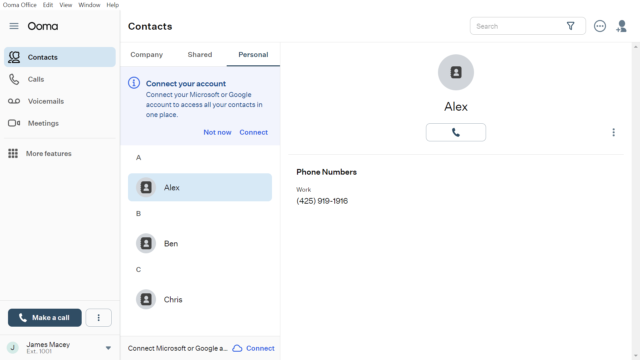
Ooma boasts a streamlined interface, which makes it easy for us to carry out some VoIP tasks, including placing outbound calls and adding new contacts. We particularly enjoyed the “New Contact” form, which included a neat notes section for customizing your contacts.
Check out our Ooma review for more information
The Ooma calling app offers basic functionality with affordable rates. Source: Tech.co testing
How much does Ooma cost?
Ooma offers a couple of different options for users who want to make international calls.
First of all, users can pay for international calls as they go with Ooma’s Basic Rates, with calls to Mexico costing only 0.29¢ a minute and calls to Pakistan costing only 1.4¢ per minute.
They could also pay $9.99 a month for Ooma’s Premier service and pay the same rates as Ooma Standard, but with unlimited calls to Canada and Mexico included at no extra cost.
Ooma also offers two contract options, the World Plan, which costs $17.99 per month and includes unlimited minutes to landlines in over 60 countries and mobile phones in over ten, and a $25.99 per month World Plus Plan, which offers unlimited minutes to landlines in 70 countries and unlimited calling to mobiles in over 40.
Is Ooma better for business or personal use?
Ooma offers business and domestic versions, but it’s widely known as a business calling solution. Its feature offering is strong across the board, and its rates are reasonable, making it an asset to most businesses making international calls.
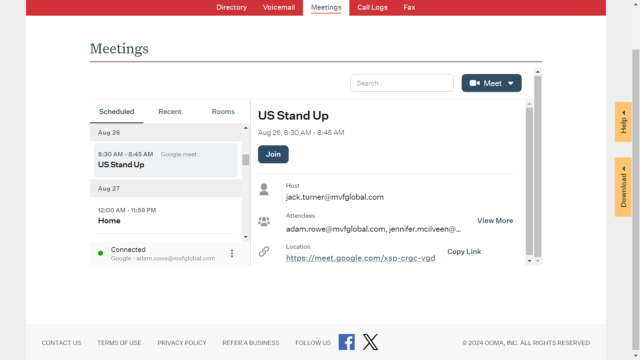
In fact, we had a chance to do a hands-on review of the Ooma VoIP phone system, and we found it to be a decidedly easy-to-use platform across our research. It provided an intuitive interface that made even complex functionalities like transcription simple to find.
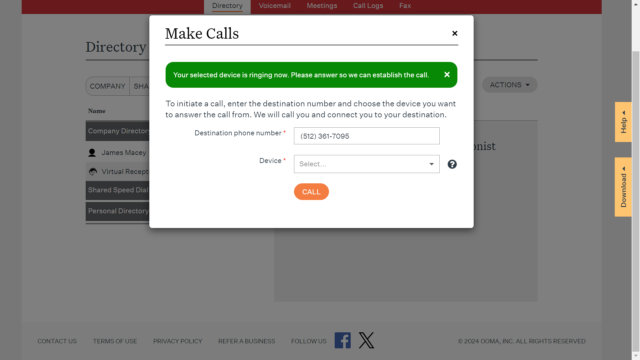
We found the Ooma directory to be a simple and intuitive spot to house all the important numbers for our business. Source: Tech.co testing
9. Rakuten Viber – Best for Overall Affordability
- Both for personal and business use, depending on particular needs
- Cluttered but highly functional app interface
- Competitive but highly varied international rates
Rakuten Viber is an affordable solution that allows for the standard practice of calling landlines and mobile devices in many countries at a competitive rate, depending on the country. This service is called Viber Out, and does not require cellular data or Wi-Fi to work.
Additionally, after we tested out Rakuten Viber, we found that it offers a similar service as FaceTime and WhatsApp in that you can call anyone internationally for free, as long as they are also using the Viber app. Granted, it’s not as popular as WhatsApp or FaceTime, but it’s free to download, which could make for an easy and affordable alternative.
We found the Rakuten Viber interface a bit cluttered but robust in its functionality. Source: Tech.co testing
How much does Rakuten Viber cost?
Viber offers affordable international rates for a wide range of countries, although some country-specific rates may be more expensive than competing apps.
For example, calls to India will cost you 1.5¢ per minute and calls to Mexico will be 1.2¢ per minute, whereas calls to Nigeria will knock you back 7.7¢ per minute.
Still, with international calling available for app users, you can get around those costs if you think it’s too much.
Is Rakuten Viber better for business or personal use?
Viber’s international calling app is probably best suited for personal use. Given the more expensive rates for international calling and the fact that most of your clients probably don’t have the Viber app, it’s safe to say it’s not ideal to run a business on it.
However, if you’re trying to make personal calls, it’s safe to say it would be much easier to get them to download the international call app to avoid the cost. Still, you can always use our free VoIP comparison tool to find a system that’s more tailored to your needs.
How International Call App Pricing Works
When it comes to the price of calling internationally, people can get pretty confused. From unlimited plans to per-minute rates, the industry is filled with a wide range of approaches that may not be immediately obvious to the average user.
Fortunately, we’re here to help. Below, we’re going to explain how you might need to pay for calling internationally, and whether or not your personal use or business needs are met by a particular provider.
Per-minute rates
In most cases, a phone system or international call app will offer per-minute rates when it comes to international calling. These rates can range anywhere from $0.01 to $2, depending on which country you’re calling.
For example, calling from the US to the UK on these plans is often free or inexpensive. However, if you’re trying to make calls to Antarctica, you could end up paying a lot per minute.
Unlimited plans
If you don’t want to worry about paying by the minute, we won’t blame you. Fortunately, a lot of these services offer a variety of monthly plans that allow you to enjoy unlimited access to international calling.
These plans often come with country restrictions, and you’ll have to pay more to have access to unlimited calling in more countries.
Business plans
While this doesn’t apply to all the apps on this list, some of them offer specific business plans that are designed to act as your company’s telephone system. Rather than investing in physical phone systems, you can get something like Google Voice for Business or Vonage to turn everyone’s smartphones into a connected communications hub.
This costs a bit extra, but the overall savings could be a huge benefit for your business.
Alternatively, you might be downsizing (the tech industry certainly has been dealing with layoffs over the last few years), in which case a switch from an existing VoIP provider to a smaller, simpler international calling service might make sense.
App-to-App vs App-to-Phone: What’s the Difference?
When it comes to international phone calling apps, there are two different types to consider that dramatically impact how users interact with the platforms: app-to-app and app-to-phone. As the names suggest, the different types relate to where exactly you’ll be making calls and, more importantly, where your call recipient will be receiving them.
App-to-app international call services
App-to-app platforms are designed to only make calls between users that are also users of the app. Basically, the person you’re calling internationally will have to also be set up with the app you’re using if you want communicate.
These kinds of apps are generally better for personal use. Here are the options on this list that are app-to-app services:
- FaceTime
- Rakuten Viber
App-to-phone international call services
On the other hand, app-to-phone platforms are designed for users to be able to call landline or mobile phone numbers from an app. Google Voice and Rebtel, for example, don’t require other users to be users of those apps to make calls; you can just dial a number and you’ll be connected.
These kinds of apps are generally better for business use. Here are the options on this list that are app-to-phone services:
- Google Voice
- Rebtel
- NobelApp
- Vonage
- Ooma
How Much Do International Phone Call Apps Cost?
The cost of international phone call apps varies dramatically depending on where you’re trying to call, how you’re trying to call, and whether you’re doing so for personal use or for a business.
For personal use, international phone call apps are pretty affordable. In fact, if you’re willing to go the app-to-app route, calling internationally is free. All you have to do is make sure the other person has the same app as you, and you can easily communicate internationally without paying a single penny.
If you’re trying to call mobile or landline phone numbers, on the other hand, you’ll likely incur some small costs in one way or the other. For starters, there are often per-minute call rates for different countries. In Google Voice, for example, call rates for different countries range from $0.01 per minute to $2.50 per minute.
Many of the business-facing providers also offer unlimited pricing plans that can cost anywhere from $10 per month to $40 per month. These plans are also typically equipped with full-on unified business communication tools to improve your business.
What Are the Benefits of VoIP Phone Systems?
VoIP phone systems offer significant benefits over traditional landlines, primarily by saving money, adding flexibility, providing more features, and improving call analytics. Here are some of the benefits of VoIP phone systems over traditional landlines.
- Save money – Landline infrastructure is expensive, but VoIP can use existing technology like smartphones to enable communication.
- Add flexibility – VoIP systems work with computers, smartphones, and traditional handsets, so you can stay in touch on the go.
- More features – VoIP phone systems offer more features, like the ability to forward, block, or re-route calls. You can even send instant messages.
- Improve analytics – VoIP systems have better analytics, so you can better understand how your team communicates in the long term.
For a better understanding of how VoIP software can benefit your business, check out our in-depth explainer video below:
We take our hands-on testing and impartial analysis seriously, so you can have complete confidence that we're giving you the clearest, most useful recommendations.
After conducting an initial exploration to identify the most relevant, popular, and established business phone platforms on the market, we selected 10 top VoIP systems and took a deeper dive into their plans to find out more about the features and functionality on offer.
Based on years of market research, product testing, and user needs analysis, we've established a VoIP system research methodology that scores each product in eight core categories of investigation, which are broken down into 44 further subcategories.
With this framework, we cover everything from internal communication tools and security options to niche training features, and it ensures we can accurately assess each product's value for its price, and suitability for different types of businesses.
Our main research categories for VoIP phone systems are:
- Call management features: The presence and quality of call handling features, including basic features such as call forwarding and voicemail, as well as more advanced features like auto-attendant and interactive voice response (IVR).
- Communication channels: Features designed to support communication other than calling, including integrations with websites and social media platforms.
- Training features: The presence and quality of features designed to support onboarding and training, like call barge, call whisper, and performance dashboards.
- Customer support: The assistance and resources provided by the VoIP service provider to customers, including online resources, knowledge bases, and access to customer support representatives and AI chatbots.
- Security options: The measures and features implemented by the VoIP service to ensure the confidentiality, integrity, and protection of voice communications and data.
- Pricing factors: The pricing structure associated with the VoIP service, including factors such as monthly subscription fees, domestic and international call rates, setup fees, hardware costs, and extra costs, like add-on features or services.
When it comes to calculating a product's final score, not all testing areas are weighted evenly, as we know some aspects matter more to our readers than others, which are merely “nice to have.” After hundreds of hours, our process is complete, and the results should ensure you can find the best solution for your needs.
Learn more about our research testing process
Lead writer Conor Cawley led the hands-on testing for this update, focusing specifically on packet loss and setup friction.
Verdict: What is the best international calling app?
After all that, we can confidently say that Google Voice is the best international call app. This app offers a whole bunch of features, competitive pricing in plans and rates, and functionality for personal use and business needs, so you can decide which option is most important to you.
However, all the apps on this list have their own perks and might be a better fit for your particular needs. For example, FaceTime is a no-brainer when making personal international calls between iPhone users, and Vonage would be our top pick for established businesses.
If you’re still unsure and want to keep exploring international calling options and prices, you can always try out our free comparison tool to get a custom quote catered to you and/or your business.
If you click on, sign up to a service through, or make a purchase through the links on our site, or use our quotes tool to receive custom pricing for your business needs, we may earn a referral fee from the supplier(s) of the technology you’re interested in. This helps Tech.co to provide free information and reviews, and carries no additional cost to you. Most importantly, it doesn’t affect our editorial impartiality. Ratings and rankings on Tech.co cannot be bought. Our reviews are based on objective research analysis. Rare exceptions to this will be marked clearly as a ‘sponsored’ table column, or explained by a full advertising disclosure on the page, in place of this one. Click to return to top of page